
Why it matters:
- Keep a history of every update for easy reference.
- Review, compare, and promote new versions when ready.
Plan availability:
- All plans have access to this feature.
- Storage limits apply; each version counts toward total storage.
Integrations or dependencies:
- Works with Admin API for automated versioning workflows.
- Versions remain private (non-public) until promoted as Current Version and set to a Live Public asset state.
How do I use it?
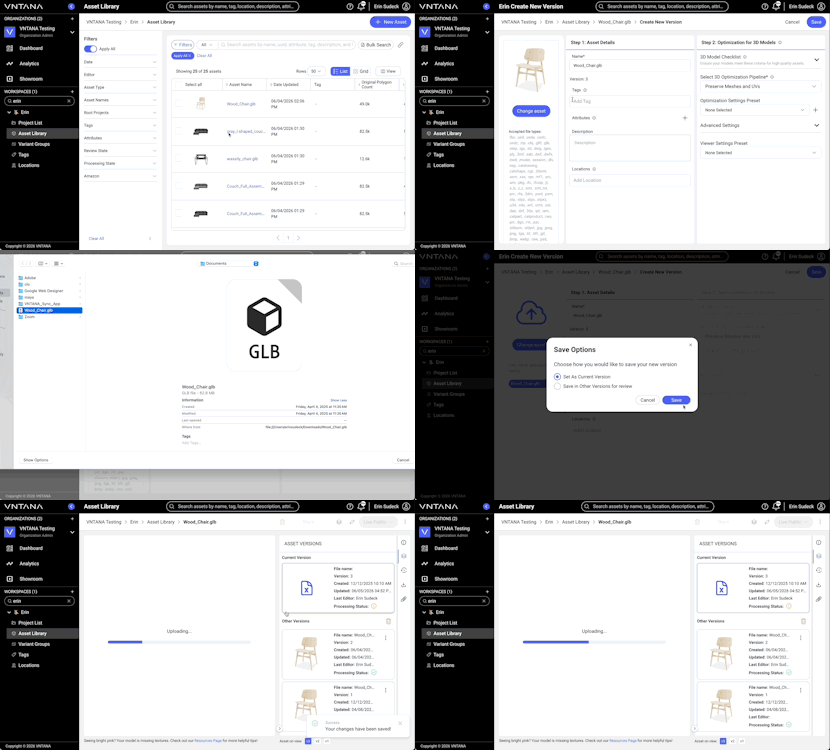
Create a Version
- Open your asset and click Create Version.
- Update your 3D file, optimization settings, viewer settings, or metadata.
- Click Save, then choose how to save your version:
- Replace Current Version: Instantly make this the live asset.
- Save for Review: Create a background version you can review or QA before making it live.
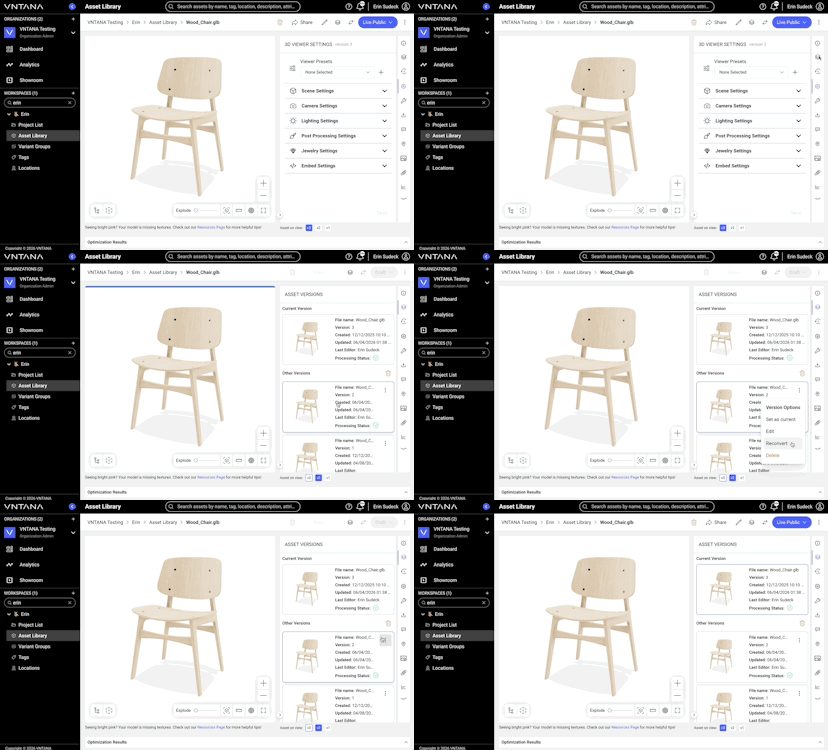
- Go to the Versions tab on your Asset Details page.
- You’ll see two sections:
- Current Version – your live, active asset.
- Other Versions – background or review versions waiting to be promoted.
- Click a version to view its preview and details.
- Use the options menu to Edit, Set as Current, or Delete a version.
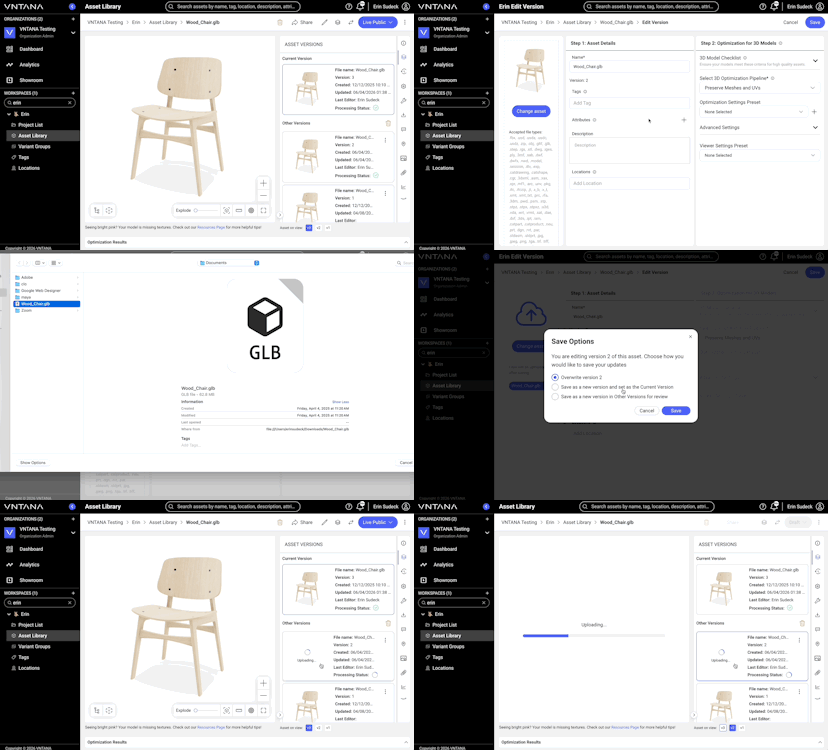
- Open the version you want to change.
- Click Edit from the Version options menu.
- Make your updates and click Save.
- Choose how to save:
- Overwrite Version [#] – update this version only.
- Save as New & Replace Current – create a new version and make it live.
- Save for Review – create a background version for later approval.
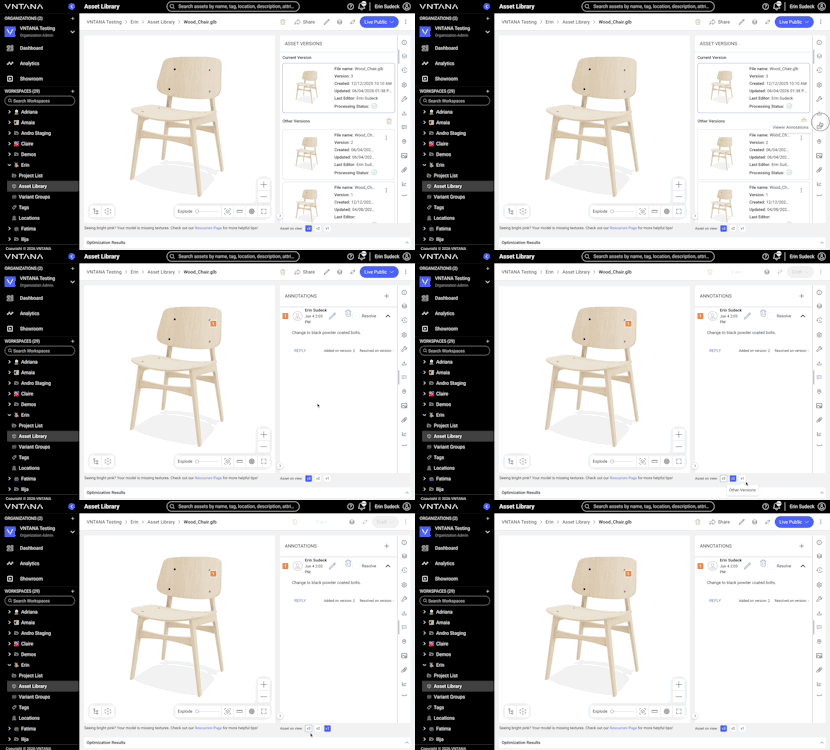
- Use the Version Toggles below the properties panel to switch between versions in the viewer.
- Each version displays its own asset info, settings, and renders.
- Quickly compare file or optimization differences without leaving the page.
Within the version options menu, select one of the below actions:
- Revert (Set as Current): Make a previous version your live asset again.
- Delete Version: Remove older or background versions you no longer need.
- Deleting a version won’t affect asset-level content like annotations or attachments.
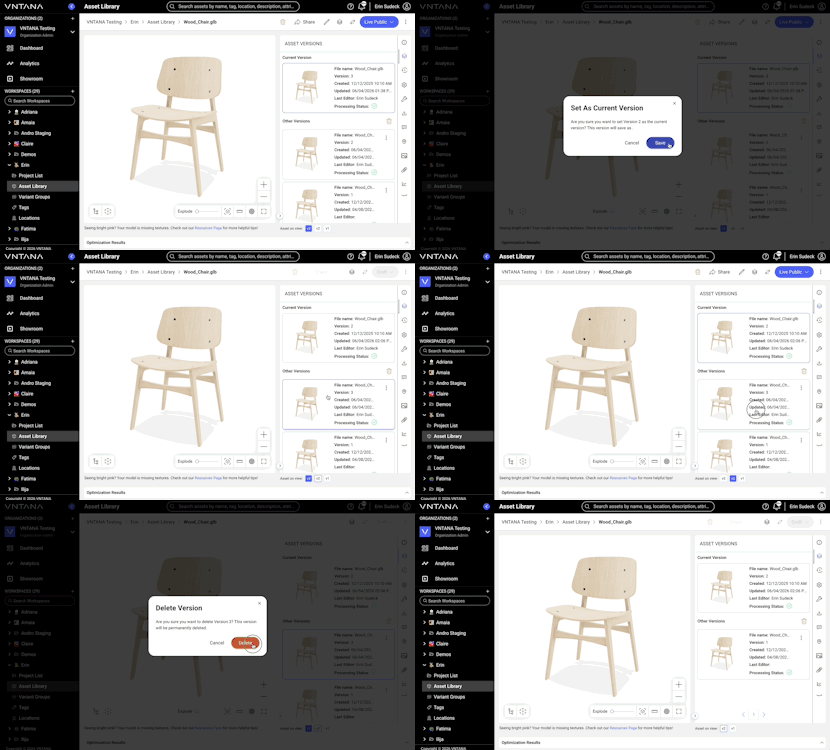
- From the Asset Library, you can:
- Bulk Edit: Update several assets at once.
- Bulk Delete: Remove selected assets or versions.
- Bulk Download: Export version files or asset history logs for multiple assets.
- The Asset History tab lists every action taken — who made the change, when, and what was done.
- Click Export History Log to download a record of these actions as a CSV file.
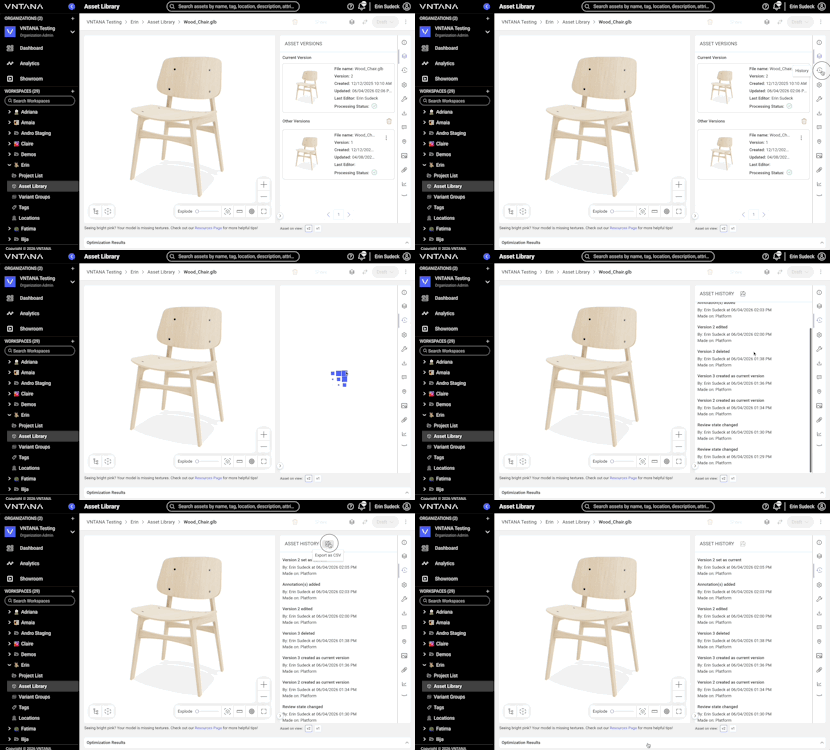
Some tabs display version-specific information; others show asset-wide content.
- Version-Specific: Asset Information, Viewer Settings, Downloads, Renders.
- Asset-Level: Annotations, Hotspots, Attachments, Debug, Analytics.
Each item lists the version it was added or resolved on, for full traceability.
Versions can be created, promoted, deleted, and set as current via the API. This section is an overview of the versioning endpoints; for full request and response details, see the Versioning API reference.
Important: The existing /v1/products endpoints continue to work and operate on the current version.
Versions are created either as a side effect of updating an asset (PUT /v1/products) or directly via the version endpoint (POST /v1/products/versions). The outcome is controlled by versionSaveOption on the product endpoint and saveOption on the version endpoint. Promotion and deletion use their own endpoints (see below).
Save Options
|
Save Options |
Effect |
|
|
Overwrites an existing version in place |
|
|
Creates a new version and immediately sets it as the current asset. |
|
|
Creates a new version intended for review or QA |
Edit Asset/ overwrite asset
-
- Endpoint:
PUT /v1/products versionSaveOption:OVERWRITE(default if omitted)- Behavior:
- Modifies the existing current version; the version number does not change.
- Endpoint:
 PUT /v1/products
{
"uuid": "84515323-6d06-46b1-bab7-f7235a0fd525",
"name": "Product name update",
"description": "Product description update",
"autoPublish":false,
"deleteAsset":false,
"attributes": {},
"pipelineUuid": "87d414ec-e1f3-4fe3-a5f9-ac4b9cdc51f1",
"viewerSettings": {
"value": "{\"scene\":{\"environment\":{\"src\":\"https://storage.googleapis.com/static-stg-mul-reg-stn-unif-vntana-com/assets/environment_maps/Studio_A_dim.hdr\"},\"lights\":{\"lightRig\":[{\"type\":\"directional\",\"intensity\":1,\"color\":16777215,\"position\":[0,0,0],\"direction\":[0.37788859497245025,-0.6253020730046984,-0.6827865898549665]},{\"type\":\"directional\",\"intensity\":1,\"color\":16777215,\"position\":[0,0,0],\"direction\":[-0.544306629479127,-0.625302032486377,-0.5592205837355044]},{\"type\":\"directional\",\"intensity\":1,\"color\":16777215,\"position\":[0,0,0],\"direction\":[-0.024428939559004506,0.6049951951138368,0.7958542836482022]},{\"type\":\"directional\",\"intensity\":1,\"color\":16777215,\"position\":[0,0,0],\"direction\":[0,1,0]}],\"lightRigOverrideColor\":16777215}},\"styling\":{\"background\":\"#ffffff\"}}",
"presetUuid": "96737c48-20dc-4774-a2e2-4bc744faa135",
"config": "{\"environmentSrc\":\"https://storage.googleapis.com/static-stg-mul-reg-stn-unif-vntana-com/assets/environment_maps/Studio_A_dim.hdr\",\"lightRigColor\":\"#ffffff\",\"lightRig\":\"directional position 0r 1.05r 0r direction 0.37788859497245025m -0.6253020730046984m -0.6827865898549665m; directional position 0r 1.05r 0r direction -0.544306629479127m -0.625302032486377m -0.5592205837355044m; directional position 0r 1.05r 0r direction -0.024428939559004506m 0.6049951951138368m 0.7958542836482022m; directional position 0r 1.05r 0r direction 0m 1m 0m\",\"background\":\"#ffffff\"}",
"ui": "{\"fsButton\":true,\"qrButton\":true,\"arButton\":true,\"centerButton\":true,\"zoomButtons\":true}"
},
"clientUuid": "37f84e3a-68c4-4c9c-9caa-6b1fb96cb8bc",
"modelOpsParameters": {
"OPTIMIZATION": {
"desiredOutput": "AUTO",
"obstructedGeometry": "true",
"poly": 75000,
"forcePolygonCount": "false",
"bakeSmallFeatures": "true",
"freezeTransforms": "false"
},
"TEXTURE_COMPRESSION": {
"aggression": "2",
"maxDimension": "2048",
"lossless": "false",
"useKTX": "false",
"bakeAmbientOcclusion": "false",
"ambientOcclusionStrength": "null",
"ambientOcclusionRadius": "null",
"ambientOcclusionResolution": "null",
"fileSizeLimit": "null",
"forceFileSizeLimit": "false"
},
"DRACO_COMPRESSION": {
"enabled": "true"
},
"AR_SCALING": null,
"ORIENTATION": null,
"PIVOT_POINT_ALIGNMENT": {
"pivotPoint": "center"
},
"OUTPUT_LAYER": {
"fbxPbr": "true"
}
}
}{
- Create Version as Current
- Creates a new version and makes it the current asset immediately.
- Endpoint:
POST /v1/products/version saveOption:NEW_AS_CURRENT- Behavior
- Any fields not included in the request are copied from the current version.
- To copy from a version other than the current one, provide
sourceVersion(the version number to copy from).
POST /v1/products/version
{
"productUuid":"b94dcff1-aa73-4d72-ab66-903720a2b791",
"saveOption":"NEW_AS_CURRENT",
"name": "Version Name",
"description":"Version Description",
"clientUuid":"37f84e3a-68c4-4c9c-9caa-6b1fb96cb8bc"
}
- Create Other Version for review
- Creates a new version that can be reviewed or validated before being set as the current version.
- Endpoint:
POST /v1/products/version saveOption:NEW_FOR_REVIEW- Behavior
- Same field-copying rules as above: omitted fields are copied from the current version, or from
sourceVersionif provided. - The current version is unaffected.
- Same field-copying rules as above: omitted fields are copied from the current version, or from
POST /v1/products/version
{
"productUuid":"b94dcff1-aa73-4d72-ab66-903720a2b791",
"saveOption":"NEW_FOR_REVIEW",
"clientUuid":"37f84e3a-68c4-4c9c-9caa-6b1fb96cb8bc",
"sourceVersion":3,
"modelOpsParameters": {
"OPTIMIZATION": {
"forcePolygonCount": "false",
"bakeSmallFeatures": "true",
"obstructedGeometry": "true",
"freezeTransforms": "false",
"poly": "95000",
"desiredOutput": "AUTO"
},
"TEXTURE_COMPRESSION": {
"ambientOcclusionRadius": "null",
"useKTX": "false",
"bakeAmbientOcclusion": "false",
"maxDimension": "2048",
"ambientOcclusionResolution": "null",
"forceFileSizeLimit": "false",
"aggression": "2",
"lossless": "false",
"fileSizeLimit": "null",
"ambientOcclusionStrength": "null"
},
"DRACO_COMPRESSION": {
"enabled": "true"
},
"AR_SCALING": null,
"ORIENTATION": null,
"PIVOT_POINT_ALIGNMENT": {
"pivotPoint": "center"
},
"OUTPUT_LAYER": {
"fbxPbr": "true"
}
}
}
- Upload a file for a specific version
- Generates a signed URL to upload a file for an existing version.
- Endpoint:
/v1/storage/upload/clients/products/asset/sign-url - Behavior
- When
versionis provided, the uploaded file is associated with that specific version. - When
versionis omitted, the file is attached to the asset's current version.
- When
POST /v1/storage/upload/clients/products/asset/sign-url
{
"clientUuid": "37f84e3a-68c4-4c9c-9caa-6b1fb96cb8bc",
"version": 3,
"productUuid": "84515323-6d06-46b1-bab7-f7235a0fd525",
"resourceSettings": {
"contentType": "application/octet-stream",
"originalName": "ring 2.fbx",
"originalSize": 20076720
}
}
- Overwrite Other Version:
- Updates the existing version in place without creating a new version.
- Endpoint:
PUT /v1/products/version saveOption:OVERWRITE- Behavior
- Targets the version identified by
version; the version number does not change. - Does not affect any other version.
- Targets the version identified by
PUT /v1/products/version
{
"productUuid": "b94dcff1-aa73-4d72-ab66-903720a2b791",
"version": 2,
"saveOption": "OVERWRITE",
"name": "Version name update",
"description": "New description",
"attributes": {},
"pipelineUuid": "87d414ec-e1f3-4fe3-a5f9-ac4b9cdc51f1",
"viewerSettings": {
"value": "{\"scene\":{\"environment\":{\"src\":\"https://storage.googleapis.com/static-stg-mul-reg-stn-unif-vntana-com/assets/environment_maps/Studio_A_dim.hdr\"},\"lights\":{\"lightRig\":[{\"type\":\"directional\",\"intensity\":1,\"color\":16777215,\"position\":[0,0,0],\"direction\":[0.37788859497245025,-0.6253020730046984,-0.6827865898549665]},{\"type\":\"directional\",\"intensity\":1,\"color\":16777215,\"position\":[0,0,0],\"direction\":[-0.544306629479127,-0.625302032486377,-0.5592205837355044]},{\"type\":\"directional\",\"intensity\":1,\"color\":16777215,\"position\":[0,0,0],\"direction\":[-0.024428939559004506,0.6049951951138368,0.7958542836482022]},{\"type\":\"directional\",\"intensity\":1,\"color\":16777215,\"position\":[0,0,0],\"direction\":[0,1,0]}],\"lightRigOverrideColor\":16777215}},\"styling\":{\"background\":\"#ffffff\"}}",
"presetUuid": "96737c48-20dc-4774-a2e2-4bc744faa135",
"config": "{\"environmentSrc\":\"https://storage.googleapis.com/static-stg-mul-reg-stn-unif-vntana-com/assets/environment_maps/Studio_A_dim.hdr\",\"lightRigColor\":\"#ffffff\",\"lightRig\":\"directional position 0r 1.05r 0r direction 0.37788859497245025m -0.6253020730046984m -0.6827865898549665m; directional position 0r 1.05r 0r direction -0.544306629479127m -0.625302032486377m -0.5592205837355044m; directional position 0r 1.05r 0r direction -0.024428939559004506m 0.6049951951138368m 0.7958542836482022m; directional position 0r 1.05r 0r direction 0m 1m 0m\",\"background\":\"#ffffff\"}",
"ui": "{\"fsButton\":true,\"qrButton\":true,\"arButton\":true,\"centerButton\":true,\"zoomButtons\":true}"
},
"clientUuid": "37f84e3a-68c4-4c9c-9caa-6b1fb96cb8bc",
"modelOpsParameters": {
"OPTIMIZATION": {
"desiredOutput": "AUTO",
"obstructedGeometry": "true",
"poly": 75000,
"forcePolygonCount": "false",
"bakeSmallFeatures": "true",
"freezeTransforms": "false"
},
"TEXTURE_COMPRESSION": {
"aggression": "2",
"maxDimension": "2048",
"lossless": "false",
"useKTX": "false",
"bakeAmbientOcclusion": "false",
"ambientOcclusionStrength": "null",
"ambientOcclusionRadius": "null",
"ambientOcclusionResolution": "null",
"fileSizeLimit": "null",
"forceFileSizeLimit": "false"
},
"DRACO_COMPRESSION": {
"enabled": "true"
},
"AR_SCALING": null,
"ORIENTATION": null,
"PIVOT_POINT_ALIGNMENT": {
"pivotPoint": "center"
},
"OUTPUT_LAYER": {
"fbxPbr": "true"
}
}
}
Promote Other Version to Current
-
- Promotes an existing non-current version to be the current asset. Unlike Create a version as current, this does not create a new version.
- Endpoint:
POST /v1/products/version/current - Behavior
- The version identified by
versionbecomes the current asset. - The promoted version should have completed processing before it can be promoted.
- The version identified by
POST /v1/products/version/current
{
"productUuid": "f1e2d3c4-b5a6-7890-abcd-ef1234567890",
"version": 6
}
- Delete an Other Version
- Deletes a single non-current version.
- Endpoint:
DELETE /v1/products/versions/{productUuid}/{version} - Behavior
- Deletes the version identified by
version. - The current version cannot be deleted through this endpoint; it is only removed when the asset itself is deleted.
- Deletes the version identified by
- Delete all Versions:
- Removes every non-current version of the asset in one call.
- Endpoint:
DELETE /v1/products/versions/{productUuid}/all - Behavior
- Removes all non-current versions of the asset.
- The current version is not deleted; it is only removed if the asset itself is deleted.
💡 Tips
- Use “Save for Review” to QA updates before promoting to current.
- Keep version names and metadata clear for quick tracking.
- Embeds auto-update after processing — no downtime for live assets.
- Collapsible optimization results save screen space for most users.
What if something goes wrong?
|
Issue |
Possible Cause |
Quick Fix |
|
Version not showing in list |
Version is still processing |
Refresh or check the Versions tab again after a few minutes |
|
Viewer not updating |
You may be viewing an older version |
Use Version Toggles to switch to the current version |
|
Version failed to process |
File error or optimization issue |
Edit the version, upload the corrected file, and save again |
|
Metadata not updating |
Processing still in progress |
Wait until processing completes |
|
Can’t promote version |
Missing approval or version not finished processing |
Ensure the version has completed upload and processing |