
Plan / Tier Availability
- Available for all VNTANA users.
Integrations or Dependencies
- The VNTANA Platform and emails will be shown in English, our default selection, until another language is explicitly set in the User’s Account Preferences.
- The VNTANA Embedded Viewers reads the location settings of the user’s computer. If unsupported language is used, we fall back to English.
- The VNTANA Metadata App and VNTANA Plugins only support English.
- User entered data is not translated.
How to Use It
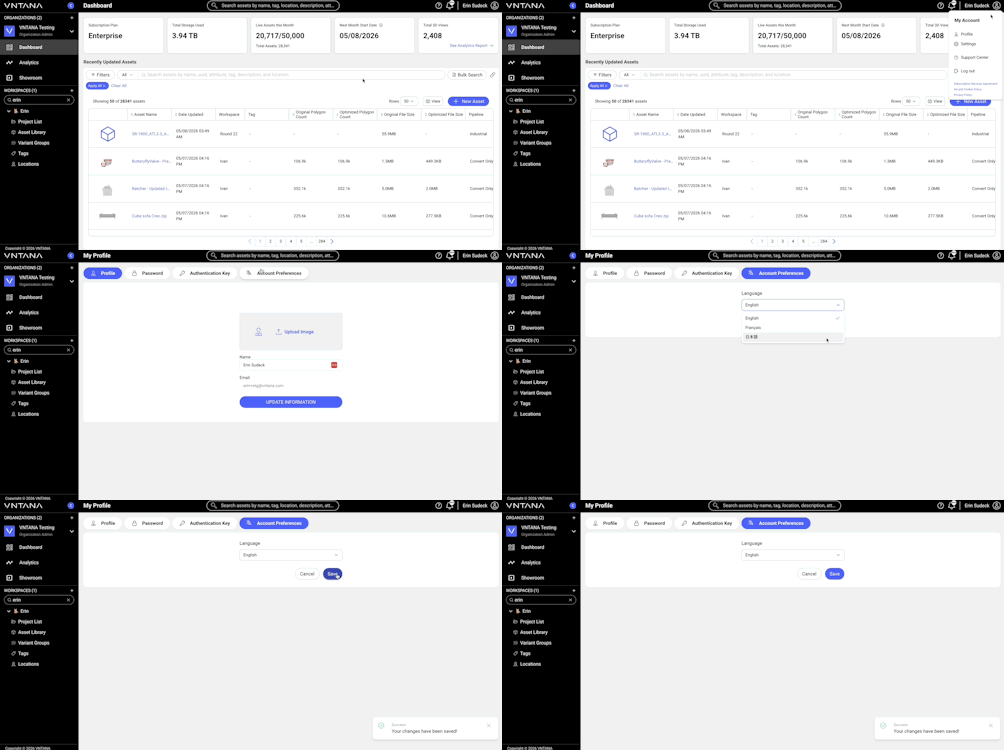
- Open the User menu
- Click My Profile
- Go to Account Preferences
- Select your preferred language from the dropdown
- Click Save
The platform will update to the selected language.
Troubleshooting Basics
|
Issue |
Troubleshooting Steps |
|
Language didn’t update |
Make sure you clicked Save when setting the language preference in your User Profile. |